
Faux123 Kernel Enhancement Pro2.5.9 - Google Play
You'll be able to see results in few seconds.
Publisher Description
FauxClock: Total Device Control, Maximize Performance, Minimize Battery Usage
*** Root and Busybox are TWO PREREQUISITES needed for this app ***
*** NOTE 1: If settings DO NOT appear to stick, make sure "Superuser" is working properly. I recommend SuperSU!
*** NOTE 2: Make sure you have BUSYBOX updated or installed.
If you run into any issues and would like to participate in fixing these issues together with me. Join my beta testing community here:
https://plus.google.com/u/0/communities/115233212982351984859
Let's work together to fix all BUGS!
*** Feel Free to email (fauxapps@gmail.com) me directly for issues and support before commenting with low ratings. Thanks! ***
Frequently Asked Question (FAQ) can be found here:
http://forum.xda-developers.com/showpost.php?p=34502852&postcount=4
This application OFFICIALLY supports the following ROOTED devices:
* Google Nexus 7 2012/2013, Galaxy Nexus, Nexus 4, 5, 9
* HTC One M7/M8, Samsung Galaxy S4/S5, Galaxy Note 3/4
* Oppo Find 5, 7
* Moto G/X 1st/2nd generation
Up Coming Support for:
This application ALSO unofficially supports ALL ROOTED ICS, JB, KK, LP capable devices (Phones and Tablets). This app will works on ALL your other ICS/JB/KK/LP devices!
*** Application Features: ***
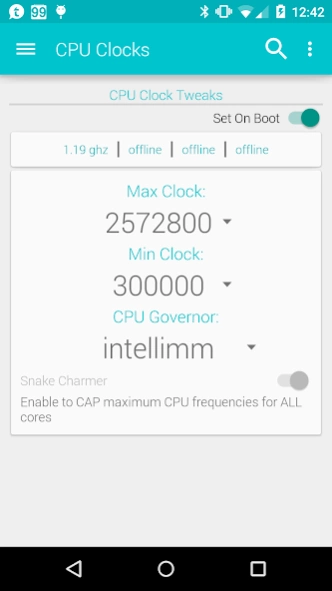
> CPU Control:
- Displays CPU core frequencies in real-time
- adjustment of CPU governors
- adjustments of CPU Min/Max frequencies
- mpdecision on/off (Qualcomm devices)
- CPU Quiet Governor (Tegra3 devices)
- Eco Mode (Battery Savings)
> Voltage Control:
- Displays current voltage per frequency
- Tweak CPU voltage (Global/Individual)
- Smart Reflex On/Off (Galaxy Nexus)
> CPU Governor Control: (supports ANY CPU governor!)
- Allows for CPU governor specific tweaks
> GPU Control:
- Displays GPU frequencies in real-time
- selection of available GPU governors (My kernel and Qualcomm Chipsets)
- GPU max frequencies (Qualcomm Chipsets and kernels with GPU Overclocking enabled!)
- GPU V-sync capability (Qualcomm Chipsets ONLY)
> I/O Scheduler Control: (Supports built-in eMMC and SDcard if available)
- Selection of available I/O schedulers
- Tweak read-ahead size
> Low Memory Killer Controls:
- Custom tweaks for LMK
> MDNIE/Gamma controls
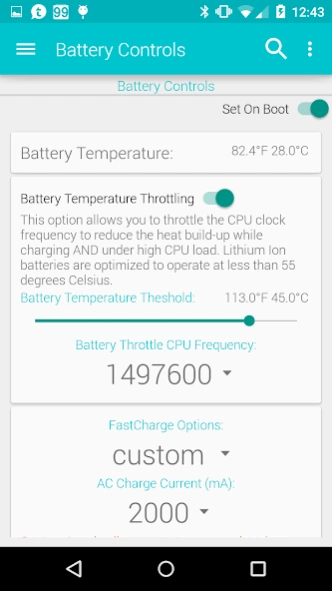
> FastCharge Controls:
- Custom Charge current controls
> Miscellaneous Control: (depending on device, not all features are available)
- Dynamic File Sync (faster storage I/O)
- TCP Congestion Algorithm
- USB FastCharge
- WiFi power management
- USB OTG Hack / charge
> Vibration Strength control
- Vibration Strength %
> Sweep2wake control
- Orientation (Nexus 4)
- Button LED (Sensation/Amaze and other HTC devices)
- Home2Wake, Logo2Wake, Home2Sleep, Logo2Sleep (HTC One ONLY)
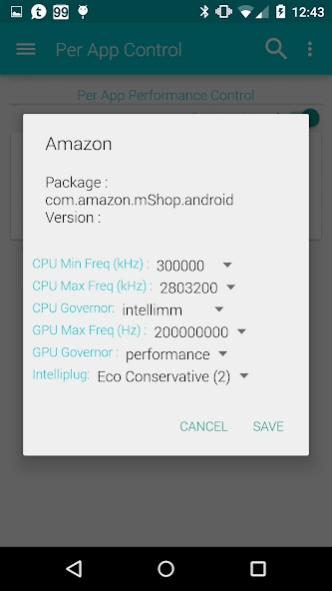
> Per App Control (Profiles!)
- CPU min/max frequencies, GPU max frequencies, GPU governor and Eco Mode
> Color Control: (Not all features are available for different models)
- Color temperature (Galaxy Nexus, Nexus 4, Samsung Galaxy S3 / S4, HTC One)
- Gamma curve (Galaxy Nexus, Nexus 4, HTC One, Nexus 7 2013)
- Contrast (Galaxy Nexus ONLY)
- Gamma look up table (Galaxy Nexus ONLY)
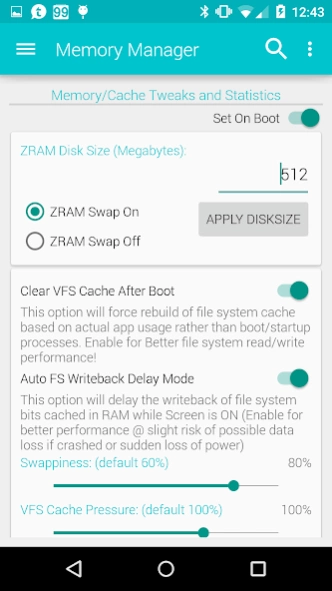
> Z-Control:
- ZRAM Swap On/Off, Disk Size
- Memory adjustments
- CleanCache / Frontswap / Z-RAM (CompCache) Stats
> Thermal Control: (Qualcomm Devices ONLY)
- Disable Qualcomm's thermald/thermal-engine/HTC's pngmgr
- Control built-in Intelli-thermal
- Thermal statistics
> Download Control: (available only for OFFICIAL devices)
- Checks for latest stable kernel and beta kernels
> Information:
- Social networking links (Twitter, Facebook and Google Plus)
- Kernel Support links (xda-developers and rootzwiki forums)
*DISCLAIMER*
I take no responsibility for any fault or damage caused by the use of this app. No warranties of any kind are given.
About Faux123 Kernel Enhancement Pro
The company that develops Faux123 Kernel Enhancement Pro is Paul Reioux. The latest version released by its developer is 2.5.9.
To install Faux123 Kernel Enhancement Pro on your Android device, just click the green Continue To App button above to start the installation process. The app is listed on our website since 2015-03-21 and was downloaded 0 times. We have already checked if the download link is safe, however for your own protection we recommend that you scan the downloaded app with your antivirus. Your antivirus may detect the Faux123 Kernel Enhancement Pro as malware as malware if the download link to com.teamkang.fauxclock is broken.
How to install Faux123 Kernel Enhancement Pro on your Android device:
- Click on the Continue To App button on our website. This will redirect you to Google Play.
- Once the Faux123 Kernel Enhancement Pro is shown in the Google Play listing of your Android device, you can start its download and installation. Tap on the Install button located below the search bar and to the right of the app icon.
- A pop-up window with the permissions required by Faux123 Kernel Enhancement Pro will be shown. Click on Accept to continue the process.
- Faux123 Kernel Enhancement Pro will be downloaded onto your device, displaying a progress. Once the download completes, the installation will start and you'll get a notification after the installation is finished.
Program Details
System requirements
Download information
Pricing
Version History
version 2.5.9
posted on 2015-03-21
Bug Fixes:,Bug 0134 - Fix Vibration and Power suspend settings not sticking,Bug 0135 - Fix few NPEs,Bug 0136 - Fix Color FC,New Features:,0149 - add fast charge for Nexus 6,0150 - add MDSS gamma controls
version 0.9.99
posted on 2013-06-29
Several fixes and updates
Disclaimer
Official Google Play Link
We do not host Faux123 Kernel Enhancement Pro on our servers. We did not scan it for viruses, adware, spyware or other type of malware. This app is hosted by Google and passed their terms and conditions to be listed there. We recommend caution when installing it.
The Google Play link for Faux123 Kernel Enhancement Pro is provided to you by apps112.com without any warranties, representations or guarantees of any kind, so access it at your own risk.
If you have questions regarding this particular app contact the publisher directly. For questions about the functionalities of apps112.com contact us.
